Let's start with a "Button"
Select "Button" Object and open the Code Builder.
Find "At start" in "Events" (Yellow Button), connect it to "Set global Variable"
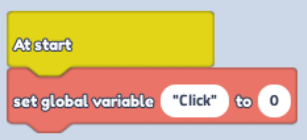
Change text to "Click" and "Value" to 0
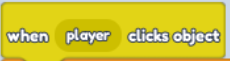
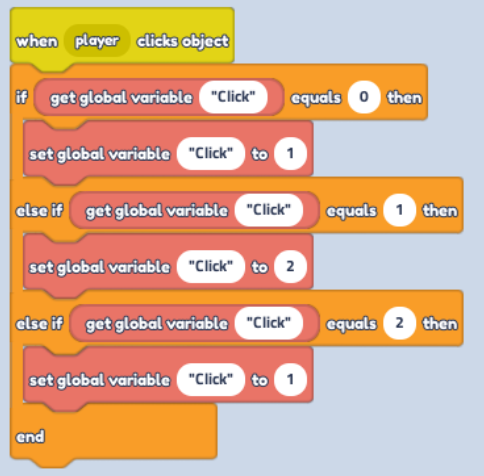
- Just below, build another Code Block. Find "When Player Clicks Object" in "Events" (Yellow Button)
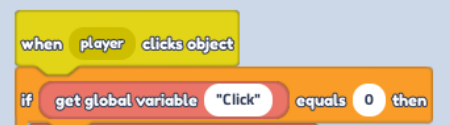
- Find "If...Equals...then" in "Control" (Orange Button)
Replace the first "Text" in Code Block "If...Equals..." with "Get global Variable" in "Variables" (Red Button), change text to "click" and "Equals" value to 0
- Continue on the same Block. Place "Set Global Variable" below change text to "Click" and Value to 1
Continue below in "Else if" Block place "Get global Variable block" change text to "Click" and "Equals" value to 1
Continue the same process below by placing "Set Global Variable" Block and change Text to "Click" and Value to 2
Then Just below on the "Else if.." Place " Get global Variable" - Text "Click" and "Equals" value to 2
Lastly add "Set Global Variable" Block, change text to "Click" and Value to 1
Move onto the "Elevator"
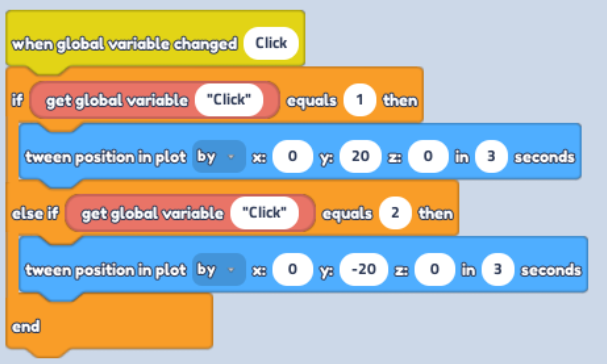
Find "When Global Variable Changed" in "Events" (Yellow Button), change text to Click

- Find "If...Equals...then" in "Control" (Orange Button)
Replace the first "Text" in Code Block "If...Equals..." with "Get global Variable" in "Variables" (Red Button), change text to "click" and "Equals" value to 1
Below place "Tween position in plot" in "Motion" (Blue Button) Change from "To" to "By" in Dropdown menu, then Y: 20
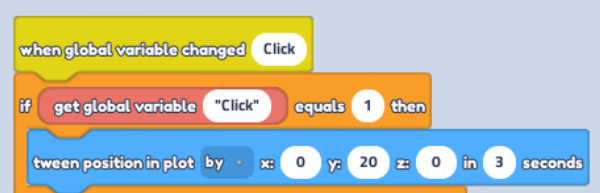
- In "Else if.." place "Get Global Variable" - Text "Click" and "Equals" value to 2
Duplicate "Tween Position in Plot" Block, but this time change Y: -20 and connect it at last.