set global variable --- to --- and get global variable ---. you can use this information to make puzzles and fun things for your maps! Don't worry, there will be some examples to practice ideas on where you can use them! - The
Set global variable -- to --creates like a box. A box you can store any information inside, like numbers, and use it later in your code.

- The
Get global variable --is like grabbing that box we made and telling whatever code we put it in, to use the information inside

**Where can we use these blocks? Here's where you might need to use it: **
Lets use the
Set global variable to --and make our "box". Place anAt startfrom Event then ourSet global variable to --from variables. In the Key, place whatever naming you want to in there. It's like labelling your box so you know which one it is! in the Value, enter what you'd like. In this case it is "0" for just empty. And that's our box!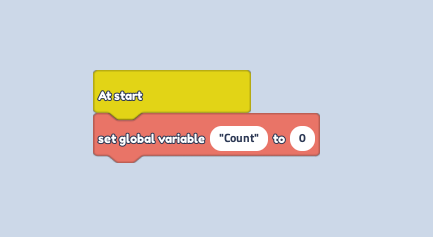
Now lets use our box in code. 1 way you can use it, is if you put a
1 plusblock inside the Value of aSet global variable to --, block and then place aGet global variable --in the first 1. This basically tells the code to add 1 value to our box when it is interacted with.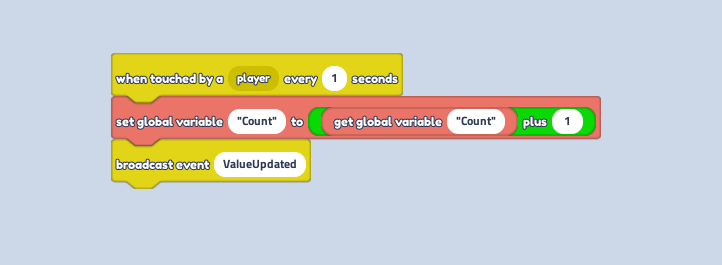
Another place you can add it, is placing it inside a
if value equals --- thenblock and putting how many number values until our box is full and triggers another action. Like saying "when the value in this box reaches (2 in this example) send the order to make stuff happen!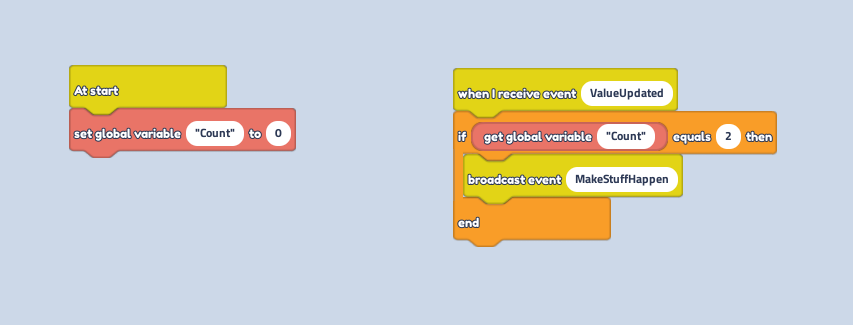
That's global variables! What will you create with it?